
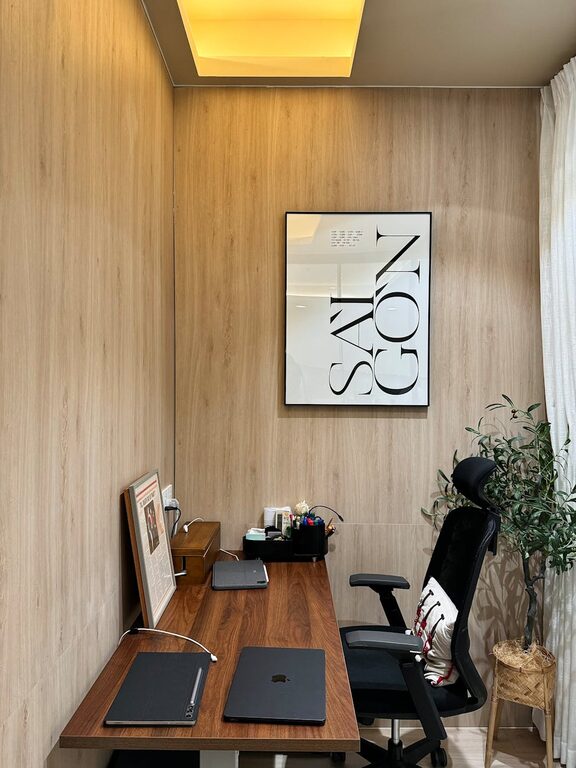
Creating a home workspace that feels relaxing and inviting can have a significant impact on your productivity and overall well-being. Whether you’re working remotely full-time or just occasionally, spending time in a cluttered or uncomfortable environment can make it harder to focus and complete tasks efficiently. Fortunately, with thoughtful planning and a few adjustments, you can transform any corner of your home into a peaceful workspace designed for comfort and success.
In this post, we’ll explore practical tips for setting up a home office that helps you stay productive while feeling calm and comfortable.
1. Choose the Right Location
Selecting the perfect spot for your workspace is the first step. Ideally, you want a place that:
– Is quiet and has minimal distractions
– Has access to natural light
– Offers enough space for your equipment and supplies
If possible, avoid setting up your workspace in high-traffic areas like the kitchen or living room. A spare room, a nook by a window, or a dedicated desk area in your bedroom can all work well.
2. Prioritize Comfortable and Ergonomic Furniture
Your chair and desk are some of the most important elements for comfort during work hours. Consider these factors:
– Chair: Use an ergonomic chair that supports your lower back and allows your feet to rest flat on the floor. If you don’t have an ergonomic chair, add a lumbar cushion for better support.
– Desk: Choose a desk height that allows your forearms to be parallel to the floor when typing. Adjustable desks or standing desks can help you alternate positions throughout the day.
– Accessories: An external keyboard and mouse can help position your hands comfortably when using a laptop.
Long periods of sitting can cause discomfort and fatigue, so investing in good furniture pays off in both comfort and productivity.
3. Maximize Natural and Artificial Lighting
Lighting significantly influences your mood and focus. Here’s how to get it right:
– Natural Light: Set up your workspace near a window if possible. Natural daylight helps reduce eye strain and keeps you alert.
– Task Lighting: Use a desk lamp with adjustable brightness to illuminate your working area without causing glare.
– Ambient Lighting: Overhead lighting or soft lamps can reduce contrast and create a more balanced, relaxing environment.
Avoid harsh fluorescent lights or working in a dimly lit room, both of which can cause fatigue and headaches.
4. Organize and Declutter Your Space
A neat and organized workspace reduces stress and helps maintain focus. Try these steps:
– Keep only essential items on your desk, such as your computer, notebook, and a water bottle.
– Use storage containers, shelves, or drawer organizers to keep paperwork and supplies tidy.
– Regularly clear away clutter and trash to maintain a clean environment.
Decluttering not only improves aesthetics but also minimizes distractions.
5. Personalize Your Workspace Thoughtfully
Adding a touch of personality can make your workspace feel welcoming, but avoid overdoing it. Consider these ideas:
– Place a small plant or a vase of fresh flowers to bring some nature indoors.
– Hang artwork or photos that inspire you but aren’t distracting.
– Use calming colors for your desk accessories and wall decor, such as soft blues, greens, or neutrals.
Personal touches can help reduce stress and make your workspace a place you enjoy spending time.
6. Maintain Good Air Quality
Fresh air supports concentration and comfort. Some tips include:
– Open windows regularly to let in fresh air.
– Use an air purifier if your room tends to be stuffy or if you live in an area with pollution.
– Keep plants that help naturally purify the air, such as snake plants or pothos.
Good ventilation helps prevent headaches and keeps your mind clear.
7. Minimize Noise and Interruptions
Noise can be a major distraction. Here are ways to reduce it:
– Use noise-cancelling headphones or earplugs during focused work sessions.
– Consider playing soft background music or ambient sounds if complete silence feels distracting.
– Communicate your work schedule to housemates or family members to minimize interruptions.
Creating boundaries around your workspace helps preserve your focus.
8. Take Regular Breaks and Stretch
Even in a relaxing workspace, sitting too long is harmful. Make it a habit to:
– Stand up and move around every hour.
– Stretch your neck, shoulders, and legs.
– Step outside briefly to get fresh air and sunlight.
Breaks help re-energize your mind and body, improving overall productivity and comfort.
9. Incorporate Technology Wisely
Technology can either enhance or hinder your workflow. Keep these points in mind:
– Invest in reliable internet and computer equipment to avoid technical frustrations.
– Use cable organizers to keep cords out of the way.
– Customize digital notifications to avoid constant disruptions.
Using technology thoughtfully helps maintain a smooth workday.
—
By applying these tips, you can craft a relaxing home workspace that supports your productivity and well-being. Remember, the goal is to create an environment where you feel comfortable, focused, and ready to tackle your tasks with ease. Making small changes over time can transform your work-from-home experience for the better. Happy working!